Manual › Basic license features
Filter
Narrow the rows in the list and the Review BOX by stars or column values. A filter applies to the list and the Review BOX at the same time.

Open it
Click the "Filter:" bar between the tabs (List / Review BOX) and the table. Click again to close it.
Stars and single frames
- "★:" chooses all rows, unrated only, a minimum number of stars, or ★5.
- Check "Exclude single-frame images" to hide rows that are a single image.
Add conditions
- Click "+ Condition" to add a condition.
- Choose a column on the left (fps, Codec, camera, Reel, StartTC, etc.).
- In the list of values on the right, check one or more. Each value shows a count, and "(empty)" can be selected too.
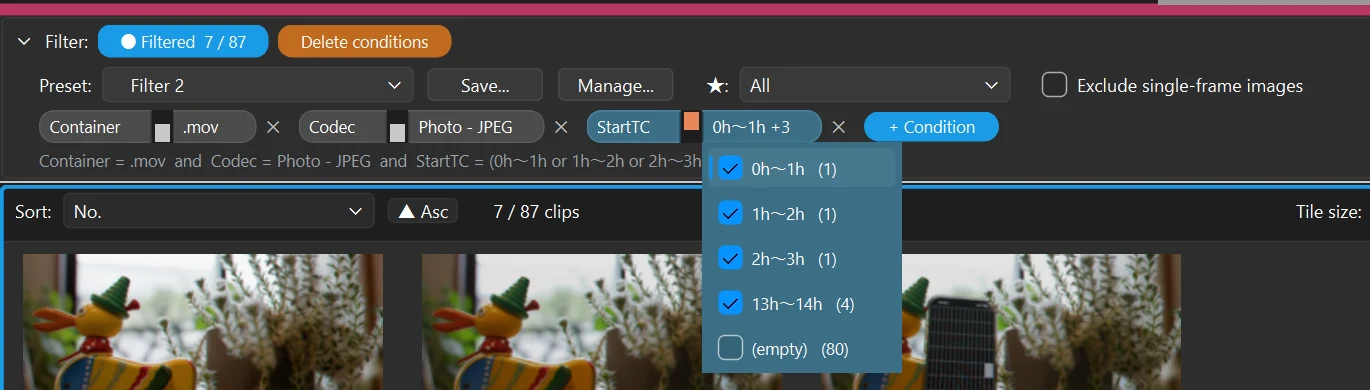
- Values within a condition are combined with OR; conditions are combined with AND.
- Duration is chosen in 6 ranges (1 s or less … 5 min and over), StartTC in hourly ranges.
- You can choose from the columns currently shown (Comment, file name, paths, etc. are excluded).
While a filter is active, the table has a blue frame and the bar shows "● Filtered n / n".
Suspend a filter
- Click "● Filtered" on the bar to suspend every condition (they are kept). Click again to restore.
- The switch in the middle of each condition suspends just that condition (up = applied / down = suspended).
- "Delete conditions" removes the star filter and every condition and shows all rows (this cannot be undone).

Presets
Save conditions you use often with "Save..." next to "Preset:". Choose where to save them:
- Both (project + this computer)
- This project only
- This computer only
"Manage..." renames, deletes and copies presets between this computer and the project. The star filter and "Exclude single-frame images" are not saved in presets.
Using the filtered rows
- Export: exporting while filtered asks "Export the whole list" or "Export the filtered rows" (Export).
- View in ShotPlayer: File → "Open the filtered results in ShotPlayer" makes a playlist of just the filtered rows.
- Save: the current filter is saved in the
.shotlistfile.